Windows Server Enterprise Infrastructure Lab
A self-built, isolated Windows domain lab — Active Directory, DNS, Group Policy, and role-based departmental file sharing secured with NTFS and SMB permissions, all validated end-to-end with PowerShell.
The Problem
Most people use a Windows domain every day at work without ever seeing what makes it tick — how a login actually authenticates against a server, why a computer locks after you walk away, or how one department can open a shared folder while another gets turned away. I wanted to understand that machinery from the inside, not just in theory. So I set out to build a small but real Windows Server domain from scratch and prove, with evidence, that the security controls I configured actually worked.
My Approach
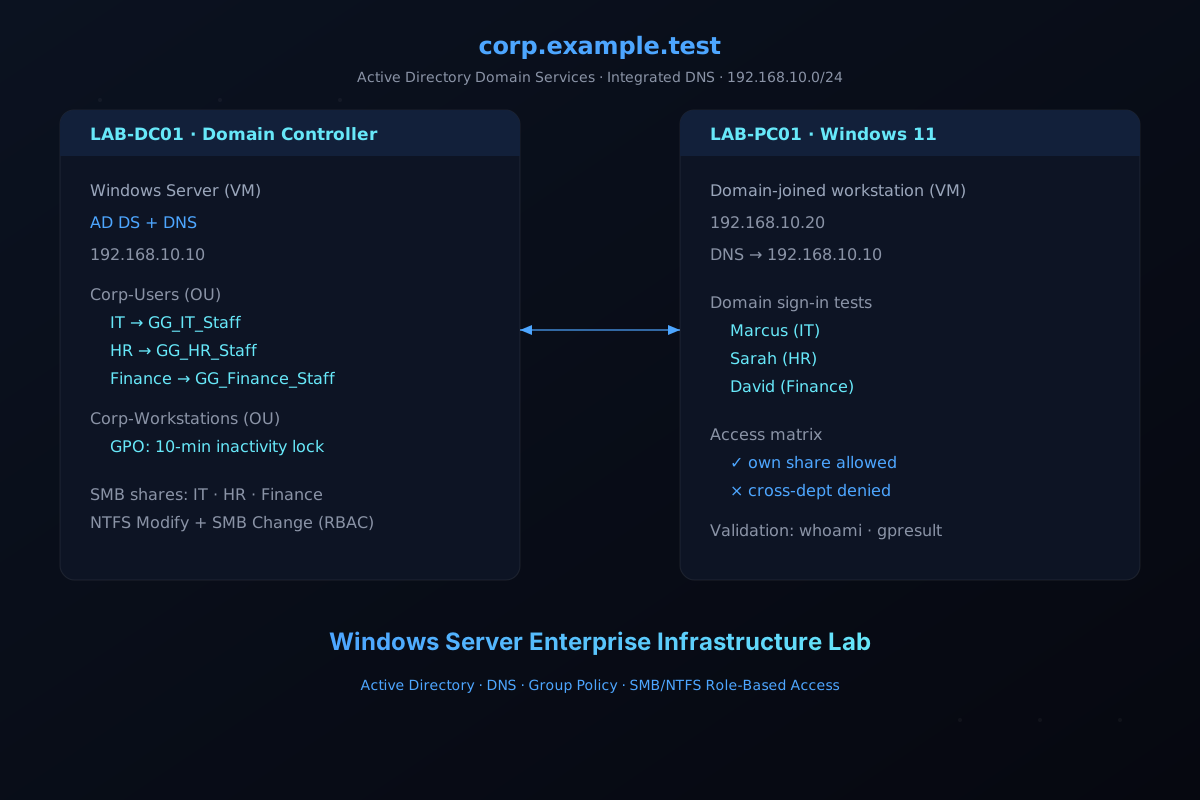
I built a fully isolated, virtualized enterprise environment on my own hardware using Oracle VirtualBox, so I could experiment freely without touching any real network. The lab is a two-machine Windows domain: one Windows Server domain controller (LAB-DC01) and one domain-joined Windows 11 workstation (LAB-PC01), talking over a private internal network (192.168.10.0/24).
From there I worked through the same responsibilities a real systems administrator owns: stand up the domain and its DNS, organize users into a sensible structure, lock down workstations with policy, and — the part most people get wrong — layer file permissions so access is granted to the right groups and denied to everyone else.
What I Built
Active Directory domain & DNS — Promoted LAB-DC01 as the domain controller for corp.example.test, with AD DS and integrated DNS providing name resolution and domain discovery for the client.
Departmental identity structure — Organized the domain into organizational units (IT, HR, and Finance under Corp-Users, plus a Corp-Workstations computer OU), created test user accounts, and mapped each department to a global security group (GG_IT_Staff, GG_HR_Staff, GG_Finance_Staff). This kept where objects live (OUs, for policy targeting and delegation) separate from who gets access (groups, for permissions).
Workstation security policy — Wrote and linked a computer Group Policy Object that enforces a 10-minute machine inactivity lock. I validated it with gpresult, confirmed the InactivityTimeoutSecs registry value, and watched the workstation actually lock after sitting idle.
Secure departmental file sharing — Created IT, HR, and Finance shares, then locked each down at two layers: NTFS file-system permissions (each department’s group gets Modify) and SMB share permissions (group gets Change). I removed the broad Everyone and CORP\Users entries, preserved SYSTEM and Administrators, and disabled inheritance on the department folders so permissions couldn’t leak down from parent directories.
Access-control validation & negative testing — Signed in as each of the three test employees and verified the full allow/deny matrix: every user could reach their own department’s share and was blocked from the other two with a Windows “Access Denied.” This was the most valuable part — it proved the intersection of SMB and NTFS permissions actually behaves the way the theory says it should.
PowerShell-driven administration & troubleshooting — Used PowerShell throughout for validation (Get-SmbShare, Get-SmbShareAccess) and dug into authentication failures with ipconfig /all, nslookup, nltest, whoami, and Windows Security event logs (Event ID 4625) to distinguish domain sign-in from local sign-in.
What I Learned
This lab turned abstract “enterprise infrastructure” concepts into things I’ve actually configured and broken. Three lessons stuck with me. First, the two-layer permission model matters — a user’s effective access to a share is the intersection of SMB share permissions and NTFS ACLs; giving a group SMB “Change” does not override restrictive NTFS permissions. Second, OUs and groups are not interchangeable — one organizes objects for policy and delegation, the other grants permissions. Third, validation is everything — a screenshot of a correct ACL means little unless you also log in as the user and watch the denial happen. I documented the whole thing — architecture, configuration, evidence, and troubleshooting — in the repository so anyone with evaluation Windows media and VirtualBox can reproduce it.